Showing posts with label tutorial. Show all posts

Tuesday, August 01, 2017

Google Extension : Take A Break By Eye Care Plus (Tutorial)

 
Hi guys!! I'm here to share something that I found in Google Extension quite helpful to me, especially when my work task mostly I will sit in front of the screen. Frankly speaking (or writing), I am tend to forgot to take a break from it. I will take short break when my eyes started to feel pain which is not good for my health. So, I search for tools to help me by remind me for just go away or do something else like take a walk or even stretch up a bit.
 
Like this one,


Cool right? I understand when we are so immerse with our work and sometimes we even forget to go to toilet. You will realize by the end of the day, "Goshhh, I don't even go to toilet today."
 
Let me share you how to have this. First thing, you need to have Google Chrome. This only applicable to Google Chrome.
 
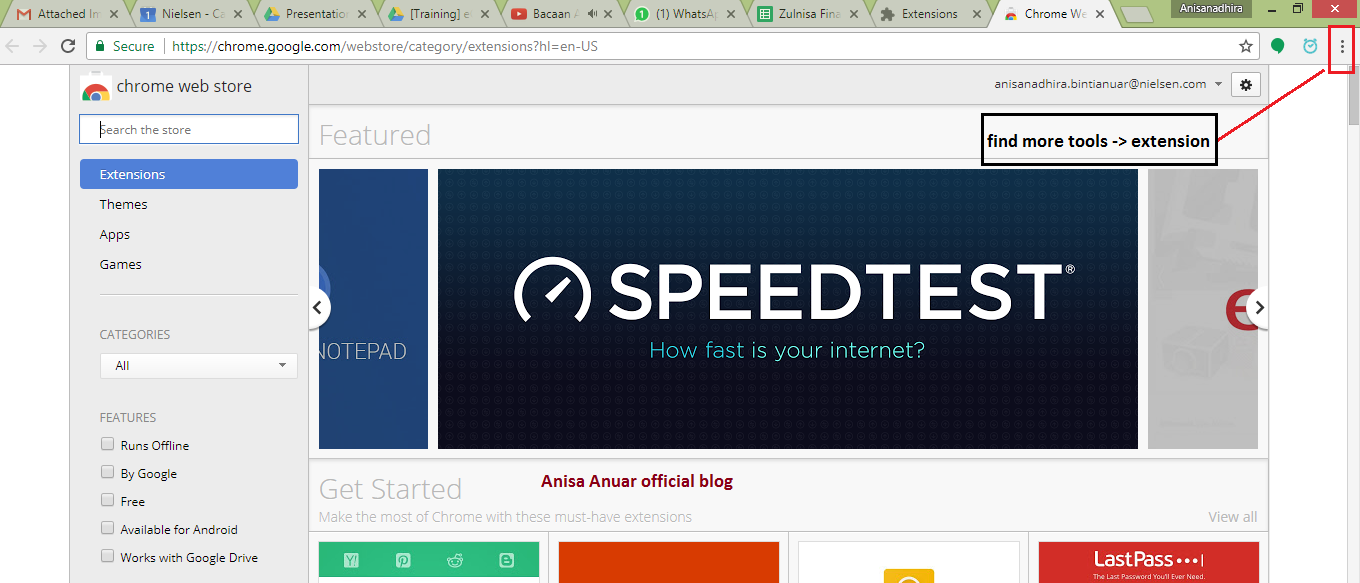
Then, go on top right (below Close X), look for more tools -> extension.
 
Search for "Take A Break By Eye Care Plus" click it and you are ready to use it.

 
The setting part, you can customize how you want it. You also can follow as default setting, but for me I go for customize setting. I know myself better, should I right? Okay let's get to the setting.
 
that's how I setting up. Every 1 hour, it will give reminder.
 
 
notification type - this thing is the key why it keep pop out at my screen
And now, give it try and see the difference. For me, yes there is good change. So, if you work with me and see me suddenly get up from my chair and stretch up, this Take A Break just remind me to do so (well, technically there's no pop out for get up from chair, but I choose to do so)


Thursday, November 08, 2012

Another customize website you should visit : Adidas


Hello everyone, yesterday I introduced to you the M&M customize website (here)
today, it's Adidas turn..hehehe..

I show you by my example Women's shoe


first, there will be lot of shoe to select, to customize please select that can only be customize.
next is to choose the shoe that you want


then at the left side of the bar, you can see and customize
according what you like: style, performance, personalize and size

there are for men, women, original and performance that can be customize.
other than shoes, you also can see other categories


why don't you try it yourself by visiting their website

for me it is easy to do the customize but as you can see the price of it..
It will be an awesome gift to have..

Wednesday, November 07, 2012

My Favourite Website


Hello everyone.. I would like to share my favourite website
that was introduced by my lecturer.


Personalize your own M&M

step 1 : choose colours
either one colour or combination two or more colours

step 2 : Add images, clip-art & messages
all of it will fit in that M&M

step 3 : select packaging
three choices are bulk and DIY, Party Favors and Simple 7oz bag

suitable for parties, present, Father's Day, Mother's Day...
this website sure friendly user and convenient to do..

so, why don't you try yourself

I would love to do this but... I just need extra money to do so..

Tuesday, November 06, 2012

I made my decision | tutorial on how to centre the header


 Hello everyone... Have you already see it??
My blog already change the header, a gift from a friend.
yesterday I told you guys that I might just put at my fb page HERE


it is because....
I have a problem how to center the header,
then miss sammy give the tutorial via my blog (comment), Anisa+ and even my fan page.
how I felt that I cause trouble to her..

simple tutorial from her

1. Dashboard>Design>Edit html>Tick Expand Widget Templates

2. look out for this code :
/* Content

3. copy this code :

.Header img {
margin-$startSide: auto; margin-$endSide: auto;}

4. put at the above  /* Content

5. save

is it helping you? because it is to me.. hehehe..
 so, now I've decide to put at fb page and here too (^_^)

Tuesday, October 16, 2012

Tutorial : Letak Widget Top commentator


Assalamualaikum kepada semua... setelah dapat permission dari blog Fendy, dia kasi saya share tutorial ni...sangat la senang, boleh buat sambil tutup mata...

tu nampak tak kat sidebar kanan...siap ada avatar lagi...
wahhh...siapa tak excited kalau di-list dalam top commentor...
contoh macam saya buat penghargaan kepada encik everything everythings..tengok SINI

kenapa nak share? benda senang nak buat...tak kan tak share dengan korang kan...

mula-mula klik link bawah ni..


pastu nanti klik pada Add Widget.. nanti akan ada pop-out window Add Page Element kan...

haaa..klik Add Widget tu terus..detail blog semua dah automatik letak...

senang kan...easy like ABC and 123 aisehhh... tak clear ke? boleh la tengok blog Fendy INI

tak sampai 5 minit pun, dah setel semuanya.. terima kasih fendy bagi permission share buat tutorial yang serious senang... lagi la semangat nak komen kita kan... baru la tahu dia ni, selalu jenguk blog kita.. dalam sebulan kita boleh tengok siapa paling top gitu..

yang paling best jugak, kita boleh terus pergi ke profile orang tu dengan hanya tekan avatar tu...

SELAMAT MENCUBA!!!

Monday, September 03, 2012

Check keberatan blog


Assalamualaikum...tadi membelek Blog Fendy...pastu figure out macam mana nak check keberatan blog yang ada sesetengah reader complain tak suka datang blog kita sebab berat...tak hingin nak jejak kat blog ni... ni result blog saya..

guna Web Tool


guna GTmetrix.com
mungkin tak banyak sangat kot nak beratnya blog ni...frankly, tak berapa terkejut dengan result ni.. lepas tu ada recommand kan satu lagi nak checknya...
ada dicadangnya lagi satu guna searchmetrics rapid...tapi ternyata sama aje... korang pulak macam mana? periksa la sama ada blog korang ni berat atau tak...selamat mencuba kawan-kawan...

Menu : Terung Masak Sambal Daebak

Bahan-bahan yang diperlukan bergantung kuantiti orang rumah anda yea. Nisa buat untuk 2 orang makan. 1. Bawang putih 3 ulas 2. Terung kecik ...

Popular Post